

Sweep&Go now offers an MCP (Model Context Protocol) server that connects your AI assistant directly to the Sweep&Go Open API. Once connected, you can query clients, jobs, staff, and reports straight from the chat – no exports, no manual lookups, no learning the API’s query syntax.
This tutorial covers the initial setup, then walks through the most valuable ways operators are actually using it.
Part 1: Initial Setup
What you need
- A Sweep&Go account with an Open API token (generated in your Sweep&Go account settings): POOfessional Plan Only > Employee portal > Settings >Open API > Generate New Token > Add Description > Click Generate
- An AI assistant that supports MCP connectors: Claude (web, desktop, or mobile), Claude Code, ChatGPT, Cursor, and most modern MCP-compatible clients
The server URL
https://mcp.sweepandgo.com/mcp
That’s the only address you need. The server acts as a secure OAuth bridge between your AI assistant and the Sweep&Go Open API.
Connecting Claude (claude.ai / desktop app)
- Log in to your Claude account
- Go to Settings → Connectors
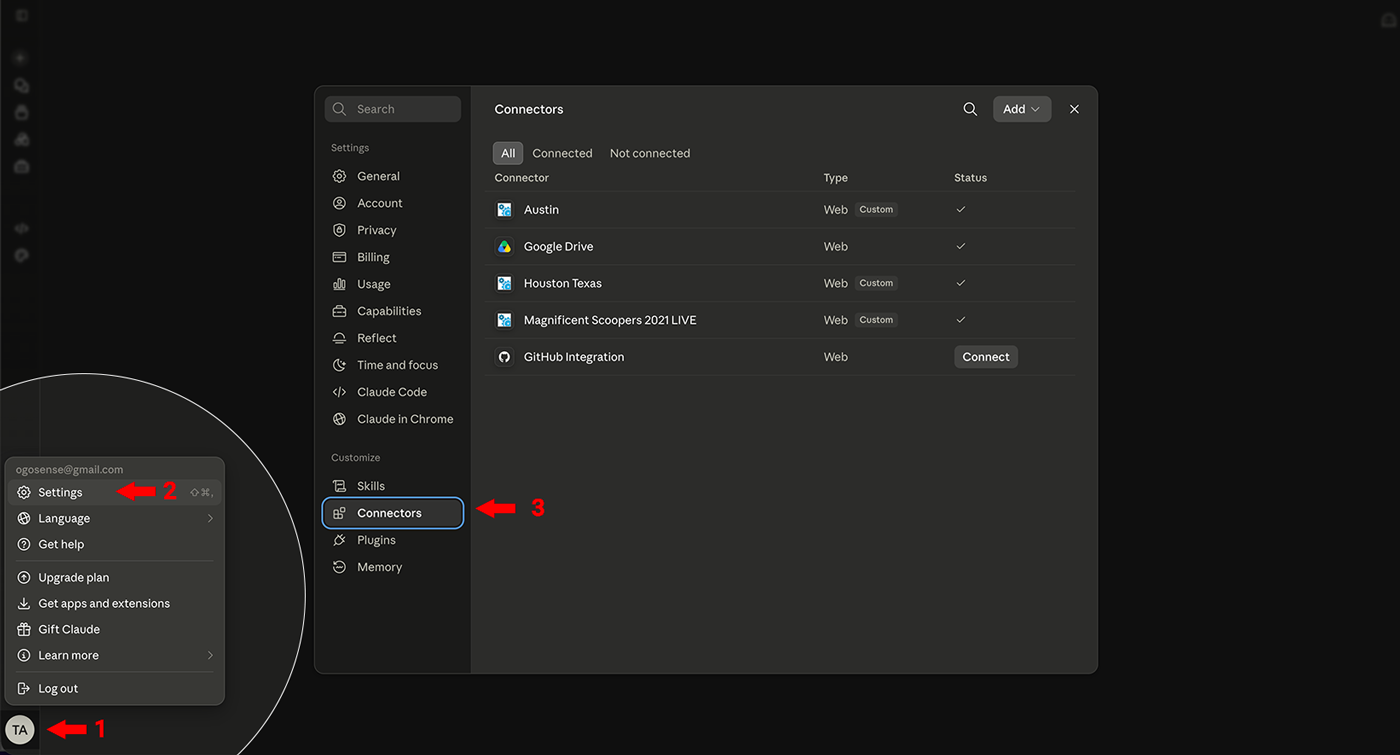
3. Click Add custom connector
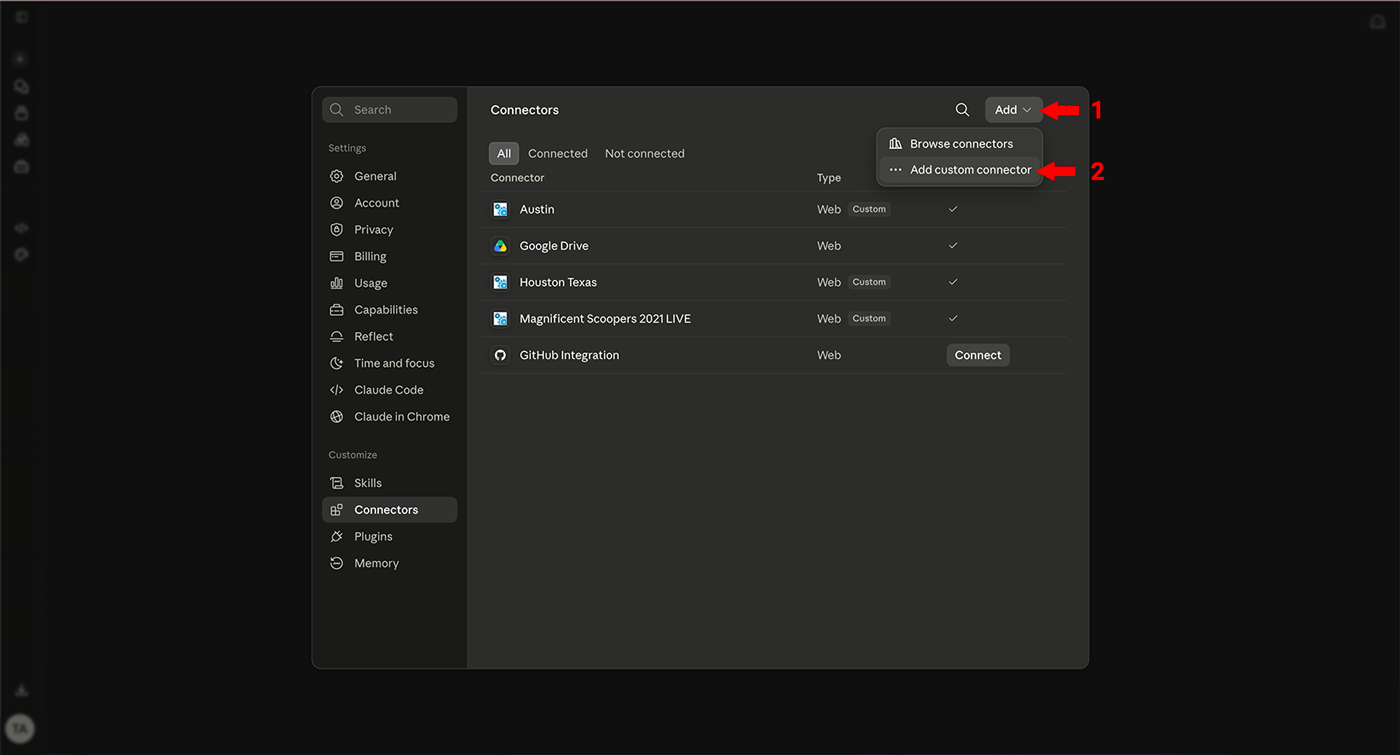
4. Give it a name (e.g., your business name – this matters later if you run multiple locations)
5. Paste the server URL: https://mcp.sweepandgo.com/mcp
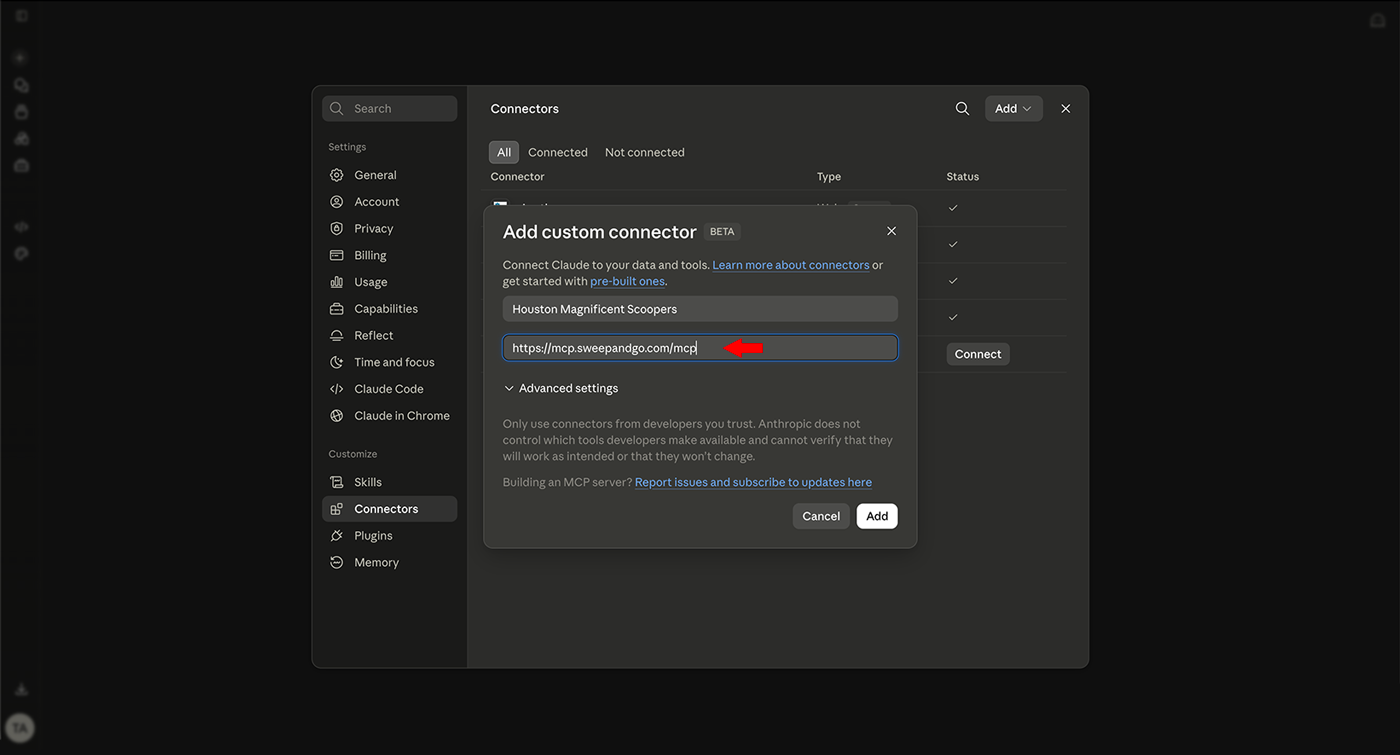
6. When prompted during authentication, paste your Sweep&Go API token
7. Done. Start a new chat, make sure the connector is enabled, and ask: “Give me my jobs for today.”
Connecting Claude Code (for developers)
From your terminal:
claude mcp add sweepandgo –transport http https://mcp.sweepandgo.com/mcp
You’ll be prompted to authenticate with your API token on first use.
Connecting ChatGPT
- Log in to your Chat GPT account
- Open Settings → Plugins → Browse Plugins → + New Plugin (custom/MCP connectors may require enabling developer mode depending on your plan)
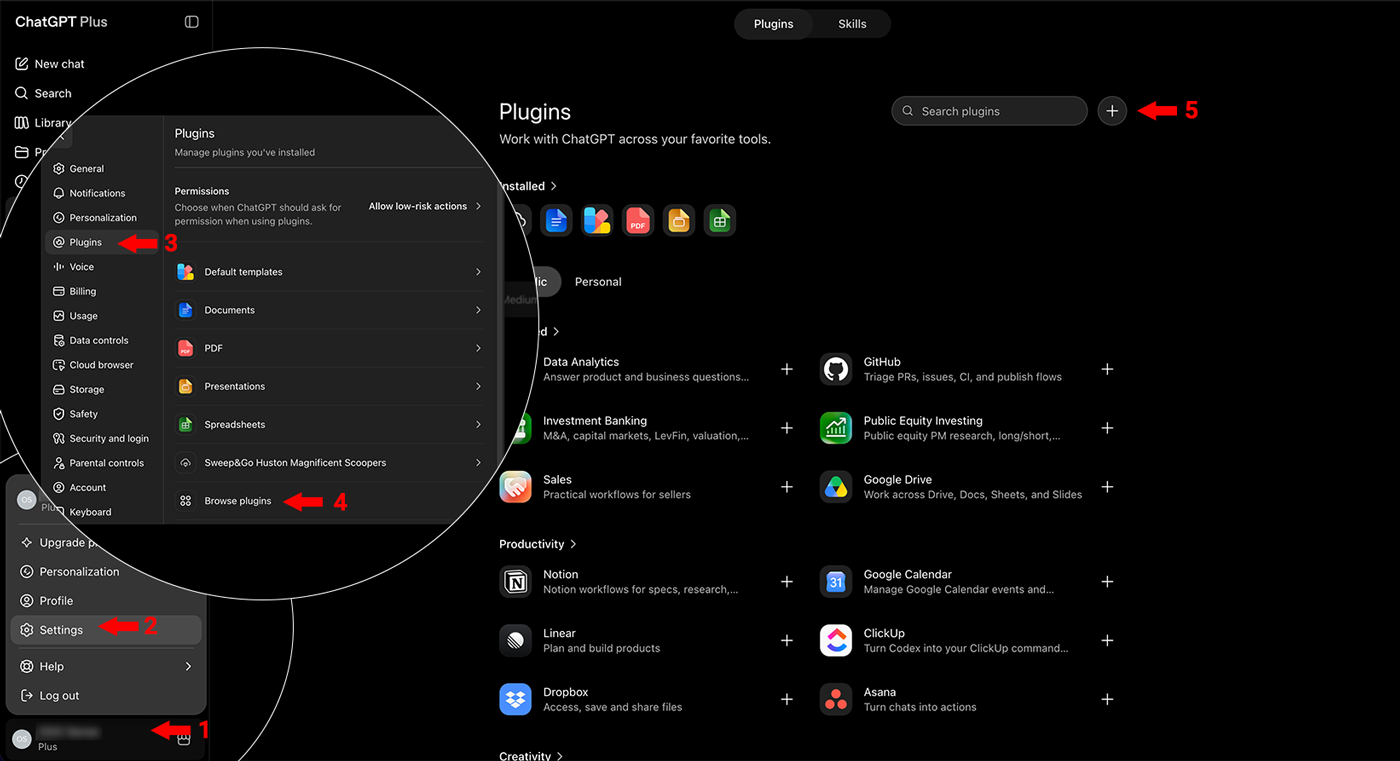
3. Add a new connector with the server URL https://mcp.sweepandgo.com/mcp
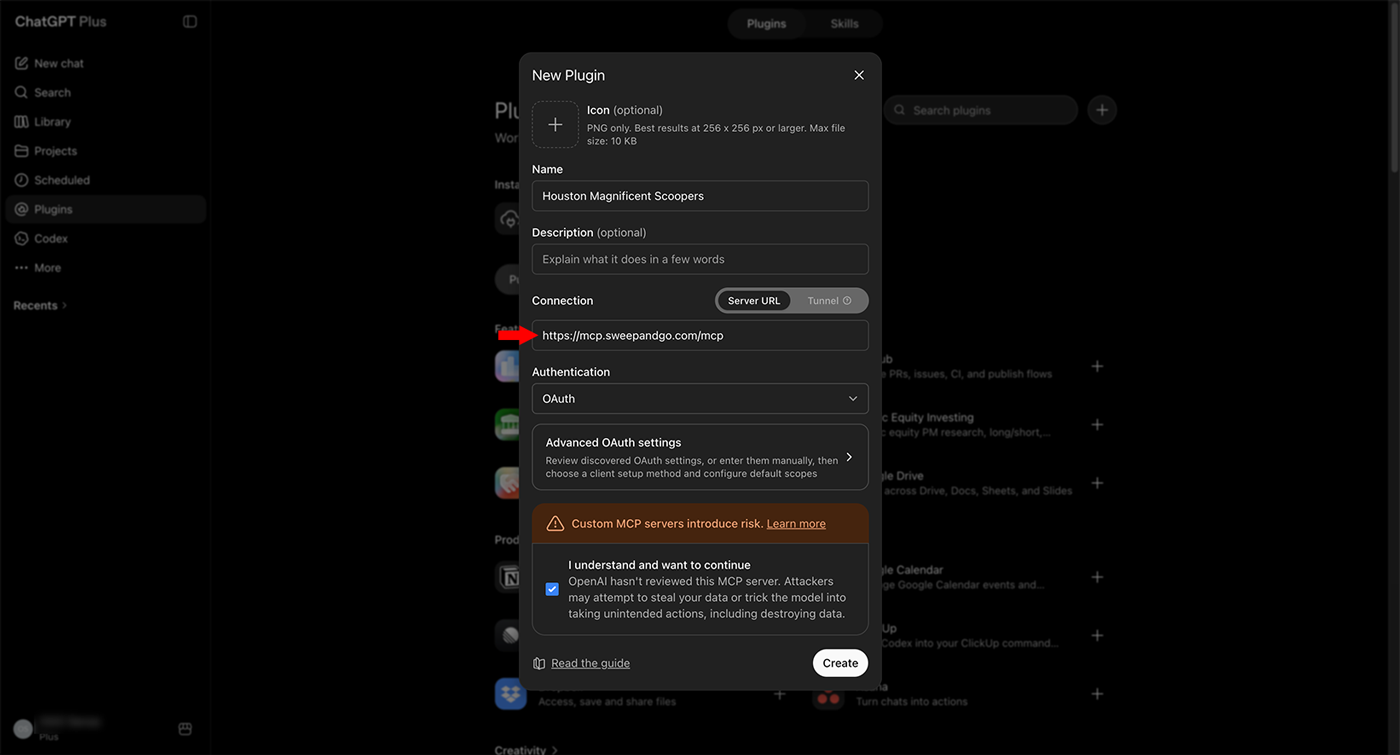
4. Authenticate with your Sweep&Go API token when prompted
Connecting other clients
Any MCP-compatible client (Cursor, Windsurf, custom agents built on the Anthropic or OpenAI APIs) follows the same pattern: register the URL as a remote/HTTP MCP server, authenticate with your token.
Verify it works
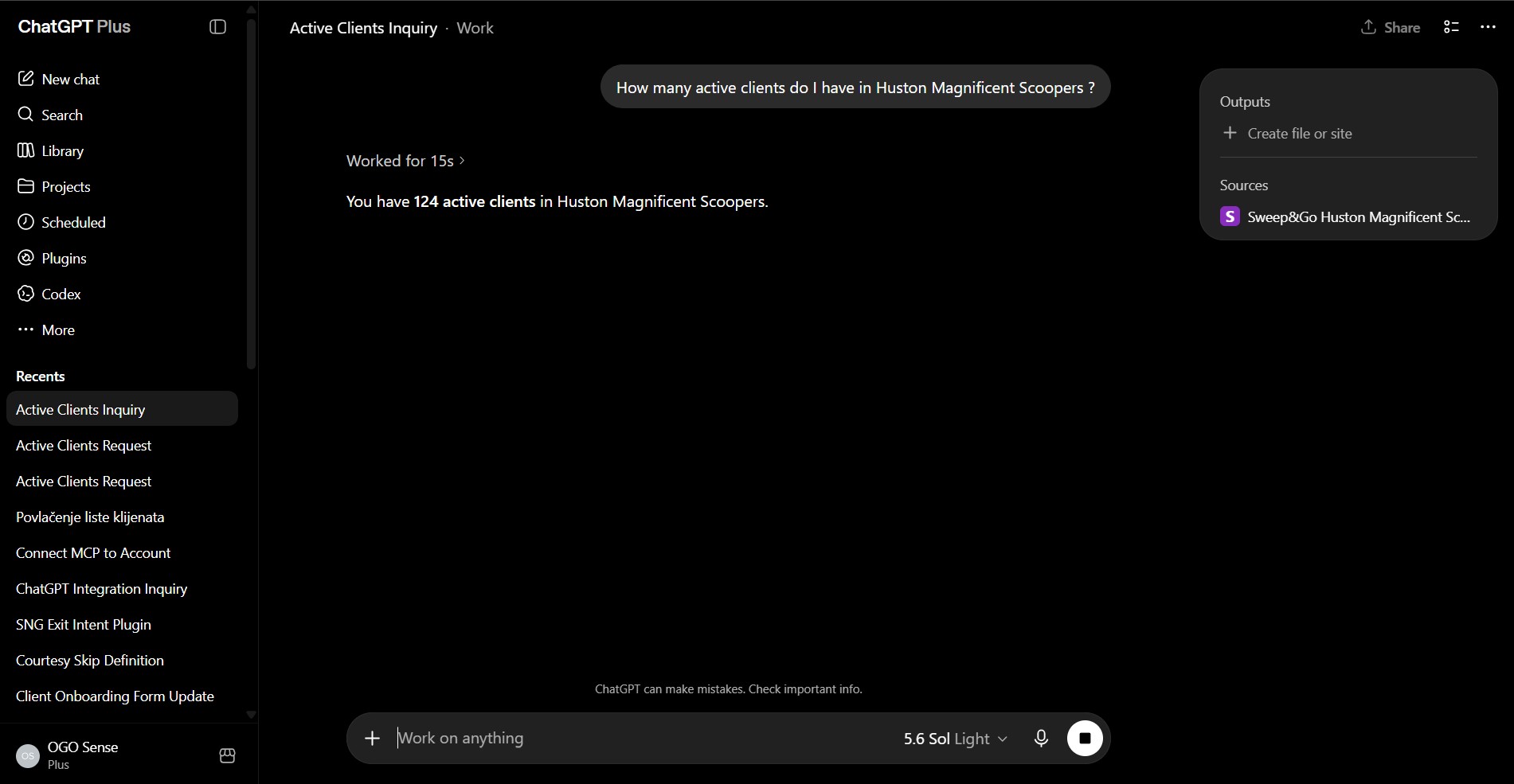
Ask your assistant something simple:
“How many active clients do I have?”
If it returns a real number from your account, you’re connected.
Part 2: Practical Use Cases
1. Analytics Layer – ask questions your dashboard can’t answer
Sweep&Go CRM has the most detailed dashboard for the pet waste removal industry including key metrics, sales information and standard exports. However, your data can be richer if you combine it with external data (example: data from your remarketing campaigns). You can also ask questions in plain English, and it pulls and analyzes the underlying data on the spot. It’s read-only, so the risk is low – and it replaces work you’d otherwise pay a BI consultant to build.
What operators are doing with it:
- Route analysis via the dispatch board – pull a technician’s route for any date and analyze stop sequence, gaps, and workload balance.
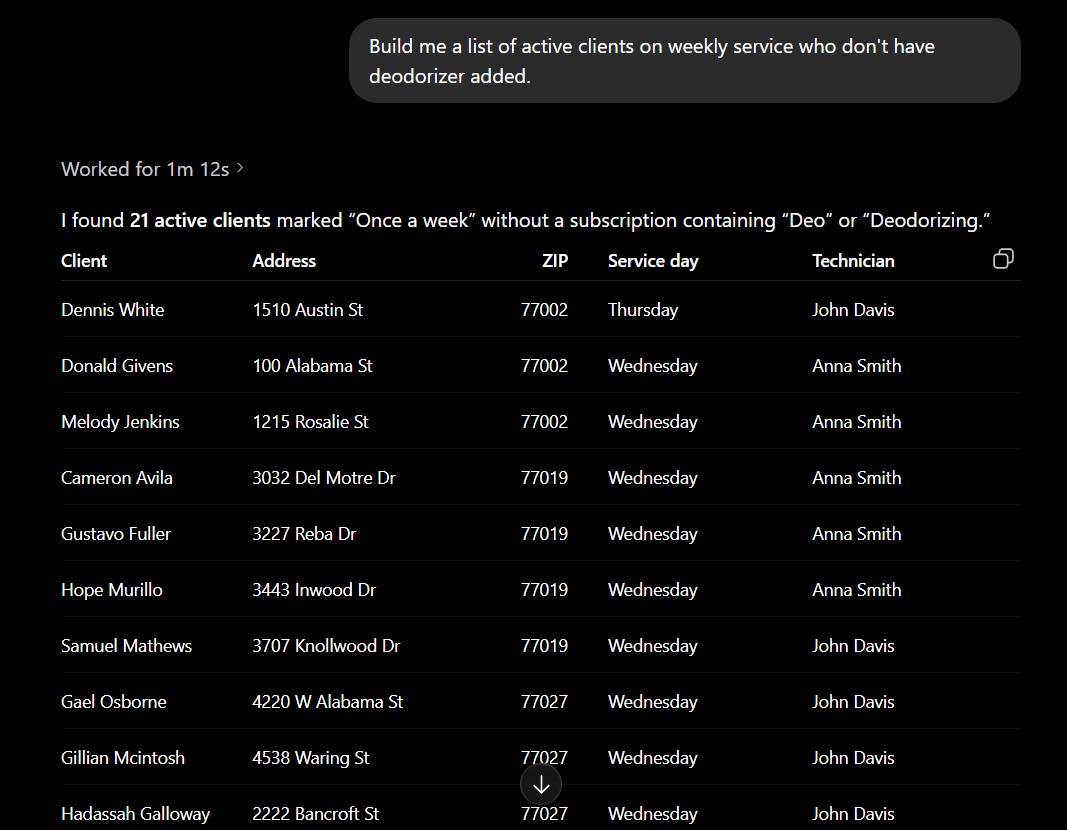
- Targeted contact lists – cultivate filtered client segments for promotions and cross-sells: “active clients in these zips with no add-on services,” “clients whose initial cleanup was over 90 days ago.”
- Multi-location roll-ups – businesses running several locations can pull stats from every account into one conversation for a single consolidated view (see Part 3 on multiple accounts), useful for both management dashboards and compliance reporting.
Example prompts:
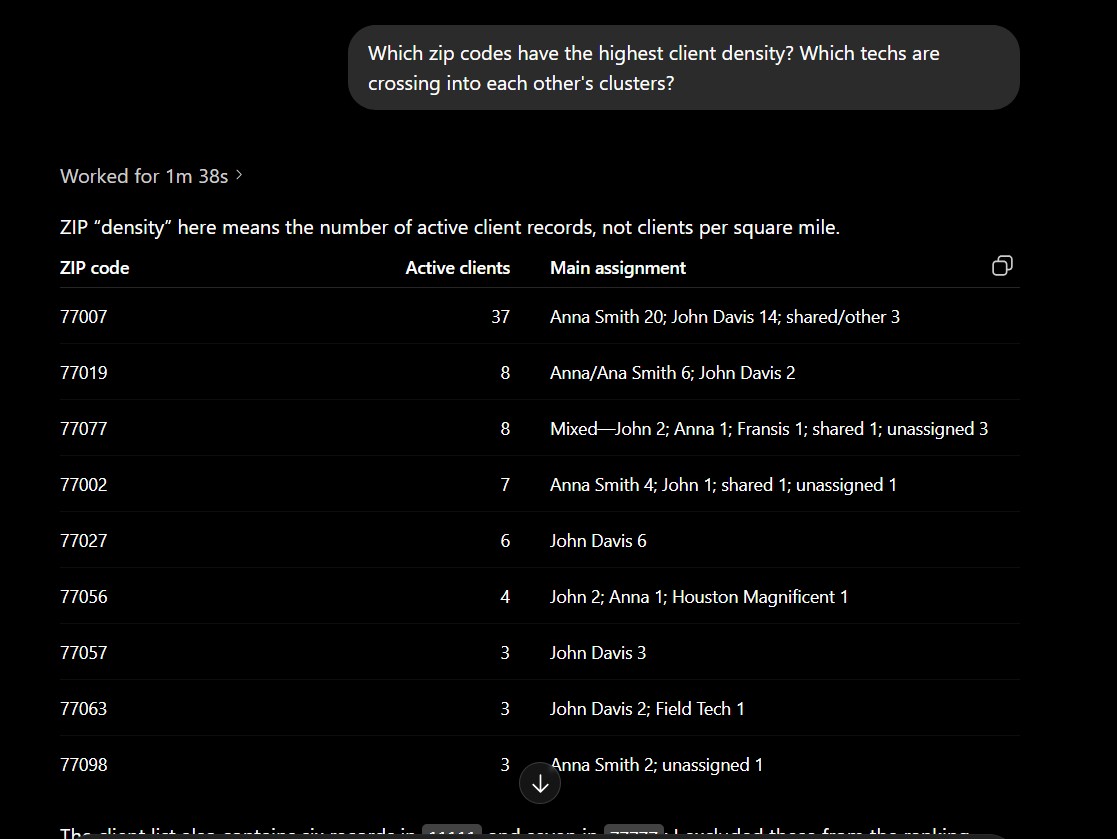
“Pull the dispatch board for the last two weeks and show me average time on job vs. estimated time, by technician.”
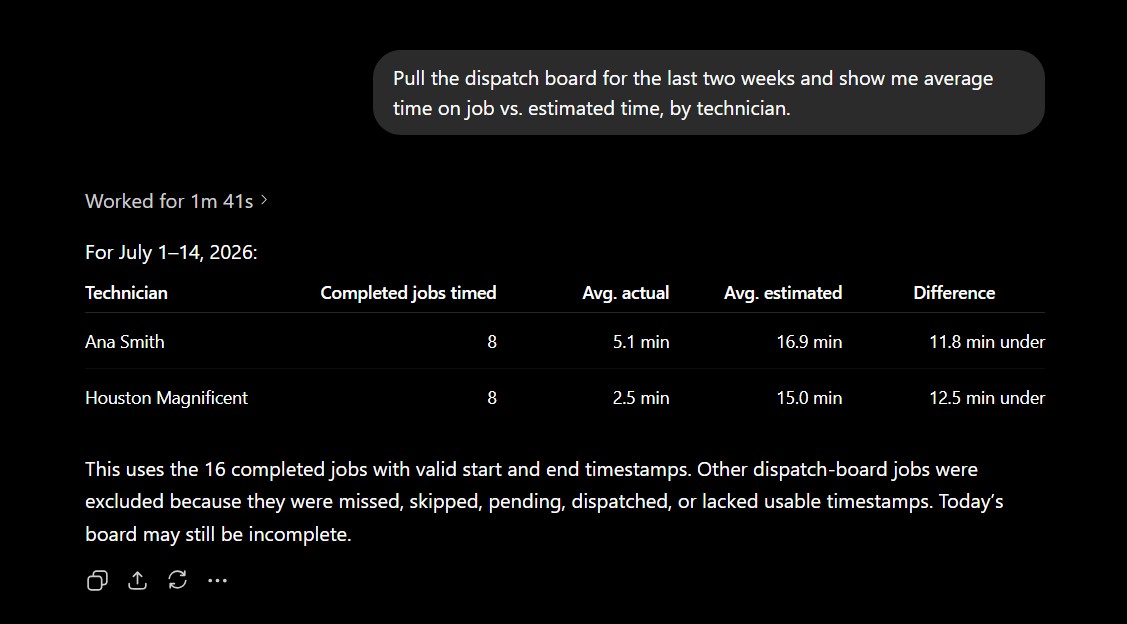
“Which zip codes have the highest client density? Which techs are crossing into each other’s clusters?”
“Build me a list of active clients on weekly service who don’t have deodorizer added.”
2. Data-Quality Checks – find the junk before it costs you
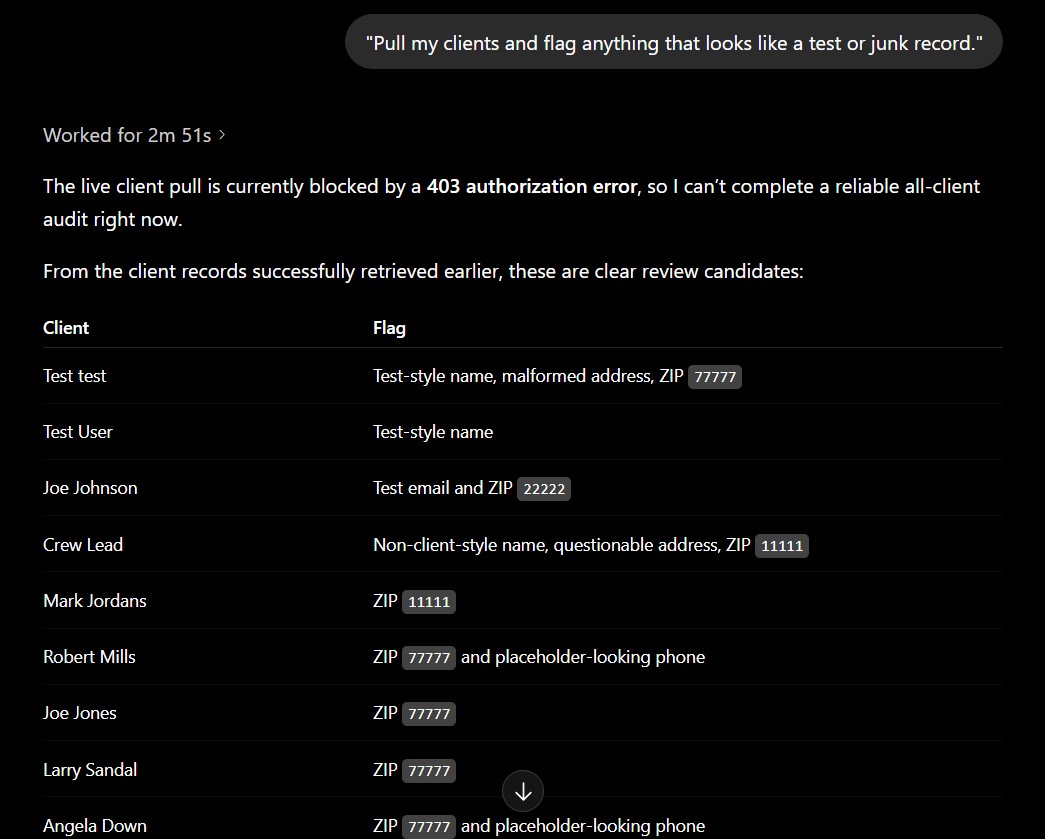
CRMs accumulate junk: duplicate records, test entries, inactive clients polluting the metrics, and endpoints that disagree with each other. AI assistants are genuinely good at the reasoning part of cleanup – spotting likely duplicates by pattern, classifying test vs. real records, reconciling why two reports show different counts, and generating a corrected list.
Best practice: let the assistant propose the changes; keep actual deletes and merges gated behind your own review. Read the list, then act in the Sweep&Go UI.
What operators are doing with it:
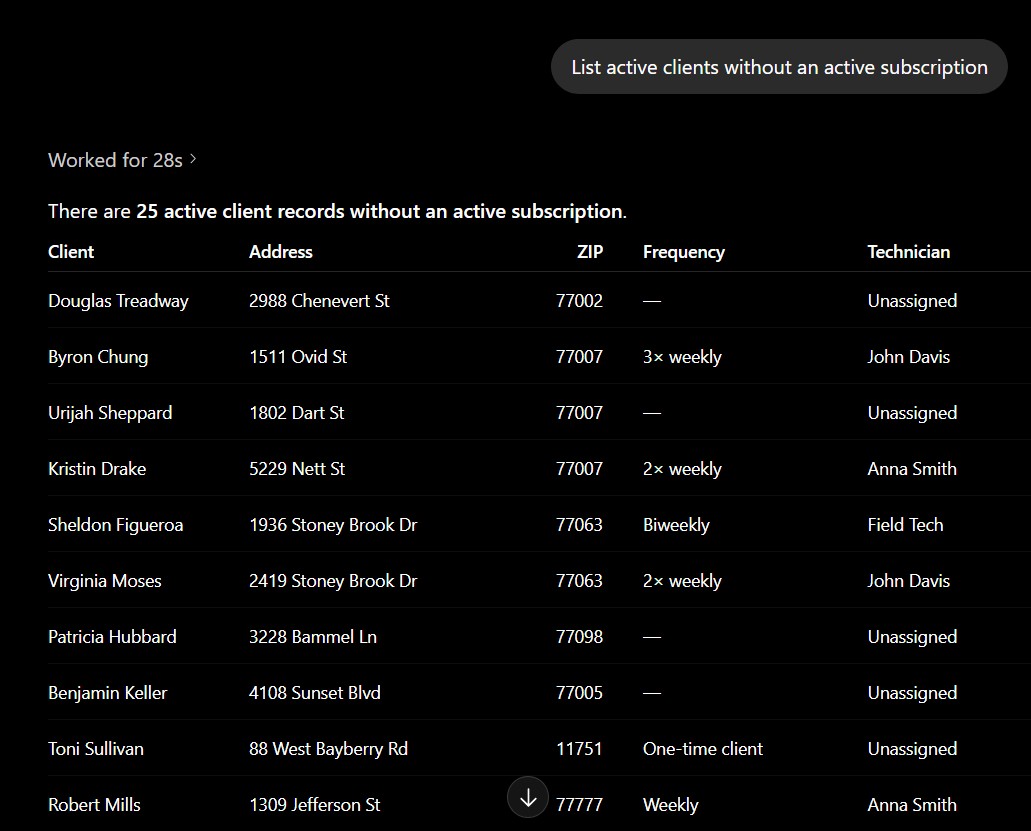
- Subscription audits – active clients with no active subscription that should have been disabled.
- Initial cleanup vs. regular service day checks – confirm every new client’s initial cleanup actually happened and their recurring service day is set correctly.
- Dispatch board history – query dispatch data across a period of time instead of exporting it day by day. This is the best place to compare time-spent-on-job against the estimate, at scale.
Example prompts:
“Pull my clients and flag anything that looks like a test or junk record.”
“List active clients without an active subscription.”
“Score this week’s new clients 1–5 based on how close they are to my existing route clusters.”
3. Interact with the API in Plain English
Every API has its own query syntax, filter grammar, and pagination quirks – and vertical software rarely has the docs budget of a big platform. With MCP, you skip all of that. You describe what you want; the assistant translates it into the right call.
Start with these:
- “Get my active client list.”
- “Get my list of active staff.”
- “Give me my jobs for today.”
- “How many jobs were completed in the last 7 days?”
From there it compounds – combine calls (“get today’s jobs, group by tech, and flag anyone with more than 14 stops”), or chain a query into an analysis without touching an export.
We want to hear from you: if there’s a question you wish you could ask your Sweep&Go data, let us know – it helps us prioritize which tools and endpoints to expose next.
4. Design Automations (For Developers)
Sweep&Go gives you webhooks and an Open API; the routing logic between them is yours to build – typically in Make.com, n8n, Zapier, or Google Apps Script. The AI assistant’s leverage here is designing and debugging that automation, not running it.
A live LLM sitting inside a recurring webhook path is expensive and non-deterministic – don’t put one in a production event flow. Instead:
- Design with the assistant: reason through Router branch conditions, work out a switch() mapping from event type to destination sheet, plan how 30+webhook event types should fan out.
- Debug with the assistant: paste a payload that isn’t behaving and ask what’s wrong; have it write the transformation logic or the signature-verification step.
- Run on deterministic infrastructure: once the design is right, Make.com / n8n / Apps Script executes it reliably at production volume for pennies.
Build it with the AI. Let plumbing run it.
Part 3: Connecting Multiple Accounts / Locations
If you operate more than one Sweep&Go organization (multiple locations, multiple brands), you don’t need anything special – you just add the connector once per Sweep&Go account:
- Add a custom connector with the slightly modified URL at the end (https://mcp.sweepandgo.com/mcp?account=austinTx) for each Sweep&Go Account
- Name each connector after the location – e.g., “Austin TX Magnificent Scoopers” and “Houston TX Magnificent Scoopers” – so the assistant knows which is which.
- Authenticate each one with that account’s own API token. The token is what determines which account’s data the connector sees.
In conversation, just refer to locations by name: “Compare active client counts between Houston and Austin” – the assistant calls each connector separately and combines the results. This is what makes single-pane multi-location dashboards and cross-location compliance reporting possible.
Part 4: Want to Process More Data? Add Webhooks + Google Sheets
The MCP is great for querying current state. For historical, event-level data at volume – every job completed, every payment, every subscription change over months – pair it with webhooks:
- Set up Sweep&Go webhooks to fire on the events you care about (job completed, invoice paid, client created, etc.).
- Route them into a Google Spreadsheet using Make.com, n8n, or a Google Apps Script web app – one tab per event type works well. (Example spreadsheet structure)
- Give your AI assistant access to the spreadsheet – e.g., enable the Google Drive connector in Claude, or upload an export.
Now the assistant can combine both sources: live account state from the MCP, plus your accumulated event history from the sheet. That’s when the deeper analytics unlock.
If you are an existing user and would like us to make additional data available, please contact us https://www.sweepandgo.com/contact/
Quick Reference
Server URL: https://mcp.sweepandgo.com/mcp
Authentication: Your Sweep&Go Open API token
Access level: Read-focused queries against the Open API
Multiple locations: One connector per Sweep&Go account, each with its own token
First prompt to try: “Give me my jobs for today”
